
Sharing content on social media has become second nature for many of us. Yet, have you ever taken a moment to consider what exactly is being published when you click the “Share” button? Spoiler alert: it’s often more than you realise.
Every time you share a post, extra information — a title, a short description and an image — is extracted from the website you’re sharing. It’s called metadata.
Understanding how this works can help you present the content exactly as you intend.

After someone takes an action on your widget (signing a petition, for example), the share step asks them to go one step further and share your campaign on social media.
Their friends will see that metadata in their feed and decide whether to act partly based on how engaging it looks. That’s why we display it as part of the share step: your supporter gets a preview of what they are about to share, and you get to see it too.
It also answers questions like “Where is the picture coming from?” — it comes from your page, and you may want to adjust it to increase the reach and success of your campaign.

And “Why is there a blank area in my widget share step?” — there we are simply showing you that it is missing on your page.
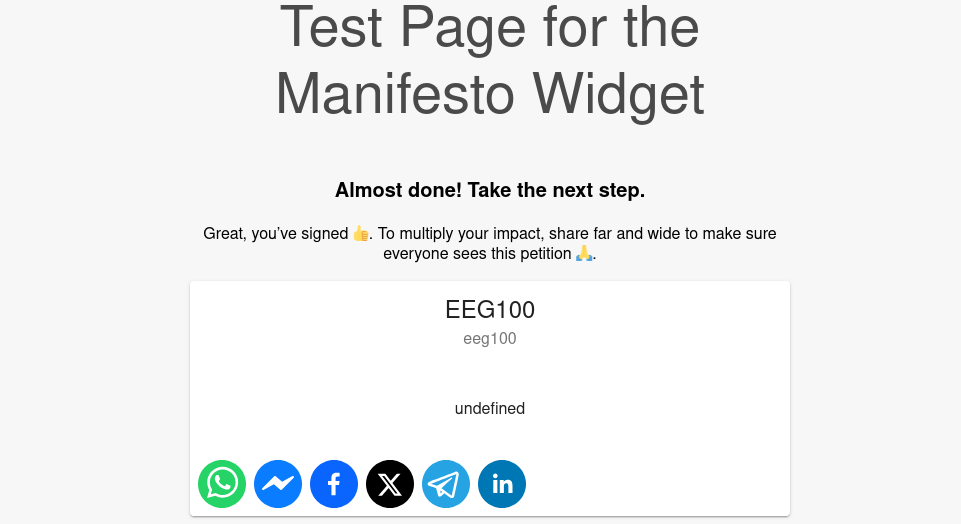
Want to fix yours right now? See fix your share step. You can also open the share step directly, without signing the petition.
Meta tags are an important part of how the web presents your content. Our widgets integrate into your website but cannot supply this data. Optimising meta tags is in your hands.
The metadata behind the scenes
Metadata is information embedded in a webpage’s HTML, typically in the <head> segment. Social media platforms extract it to create rich previews with titles, descriptions, images and URLs. Specific meta tags control what people see when your content is shared.
Open Graph (OG) tags
Used by platforms such as Facebook, Messenger and LinkedIn to generate rich previews:
og:title— the headline of the content, designed to grab attention.og:description— a brief summary that gives the viewer context.og:image— the URL of the featured image shown alongside the title and description, often the first thing people notice.
For the full list of OG tags, see the Open Graph Protocol website.
X (Twitter) Card tags
X uses its own tags, falling back to Open Graph when they are absent:
twitter:card— the card type (for example summary or summary_large_image).twitter:title— the title of the content.twitter:description— a concise summary.twitter:image— the featured image URL.
Not every network uses every tag. This article goes into more detail, or you can ask your favorite AI.
Your CMS may be deciding your metadata for you
When page metadata is missing, your CMS (content management system, such as WordPress) may generate something using predefined rules. For example:
- Title — generated from the page or post title.
- Description — extracted from the first few lines of text, or left blank.
- Image — the first image in the post.
Instead of generating content, some systems fall back to the site’s default metadata, usually configured for the homepage.
How WordPress fills in the blanks
If page meta tags are missing, WordPress generates a description from the first 150–160 characters of the content, and uses the headline and the website URL.

Plugins like Yoast SEO (probably already installed on your site) make it simple to set proper values for each campaign page.
The preview is more than a secondary feature
Besides share icons for WhatsApp, Messenger, Facebook, Telegram, X and LinkedIn, the share step shows a preview of the shared content. That preview is not decorative: it displays the metadata extracted from your website’s HTML, which may become part of your supporter’s post.
In the image below, the left side shows the metadata extracted from your HTML, and the right side the corresponding parts of your HTML head:
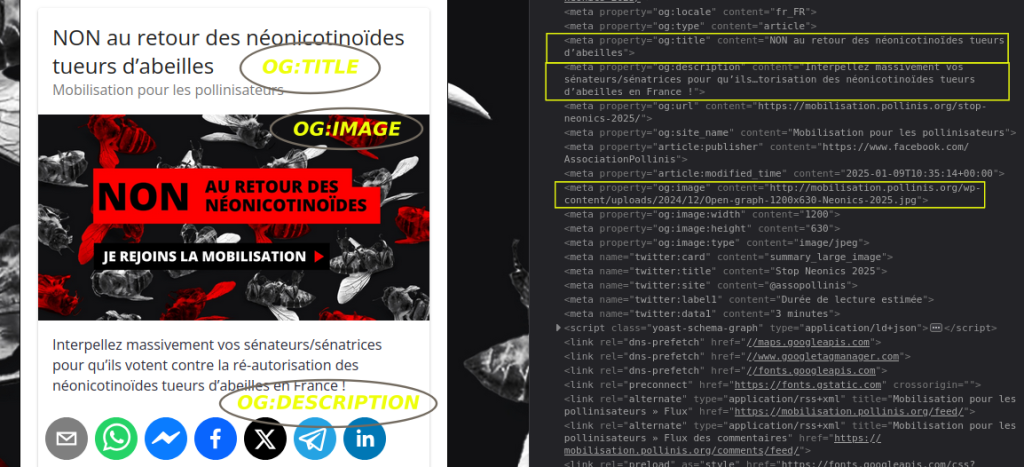
When metadata is incomplete or missing, posts look unpolished — no illustration, vague text. With meta tags on point (the right image, a clear title, a compelling description) your content shines wherever it spreads.
Take a look at your share step and you’ll know whether it’s time to optimise your metadata.