
Proca widgets are placed on your website with a small piece of HTML code. On WordPress this means inserting a Custom HTML block; the code tells the page to load your widget from our server.
Copy the widget code
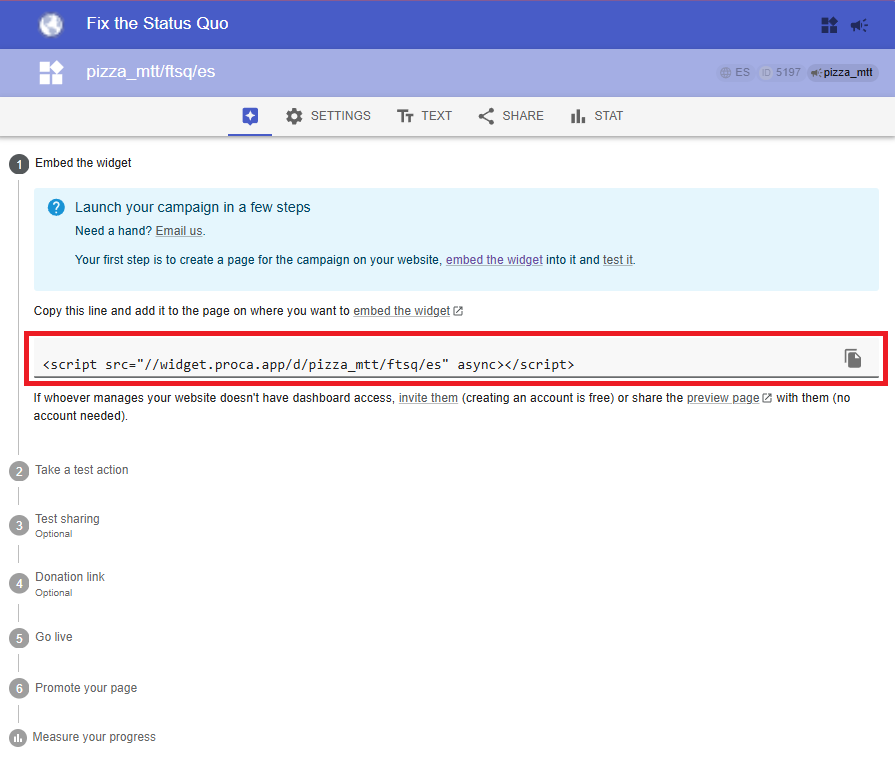
On the dashboard, open your widget’s main page.
Copy the code. It looks like: <script src="https://widget.proca.app/d/do-not-panic/42" async></script>
That HTML code can be placed anywhere on your website. That is all you need.
Insert it as Custom HTML
Website builders treat pasted text as text to display, so you must insert the code as code. On WordPress, add a ‘Custom HTML’ block and paste it there. Other CMSs have an equivalent – search ‘insert custom HTML into [your CMS]’. The video below shows the WordPress version; it takes under a minute.
Next: test your widget before promoting it.
Read also: Why Proca widgets are better than an iframe