
Once someone signs a petition or sends a message to target, they’re already engaged – which makes that moment a great time to ask for a donation. This page walks you through the options to add a donation step to your campaign.
Want to understand why the donation step works so well after another action? See Giving is engagement: getting the donation step right.
Choose how you want to collect donations
1. Link to your own donation page
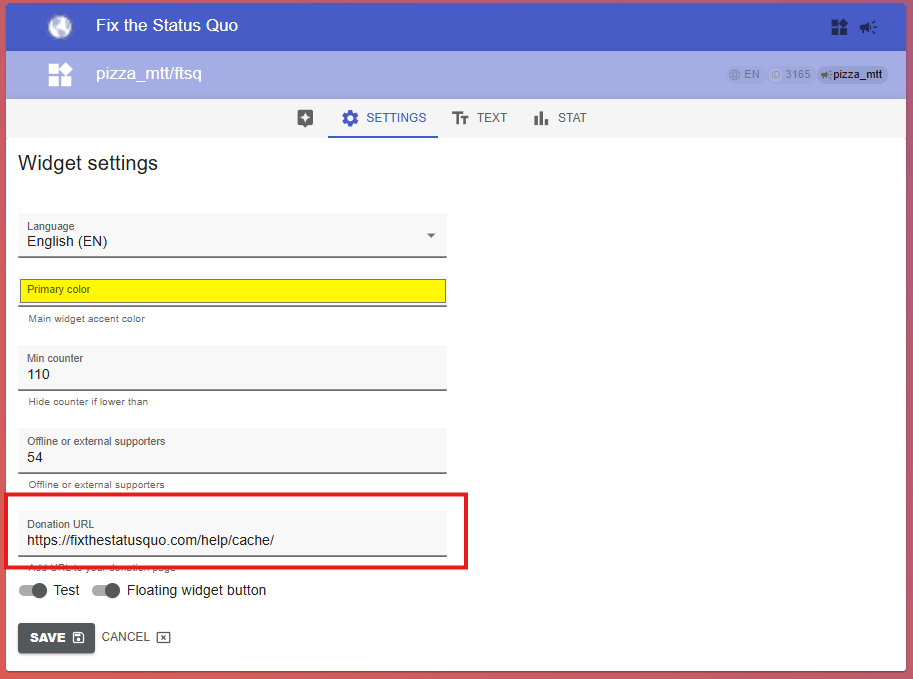
Best if you already have a donation page or platform (SEPA, PayPal, Stripe, or anything else). You can set this up yourself – no need to contact us.
Go to your widget’s Settings tab and add the donation URL. Save the changes.
2. Full integration with your fundraising platform
Best if you want donation forms pre-filled with the supporter’s details and deeper tracking. This requires custom setup on our side – get in touch and our team will configure it with you.
3. Use our built-in donation form
Best if you don’t have your own fundraising platform. This uses our ready-made Donate action, which accepts credit card donations via Stripe or PayPal. Contact us to have it switched on for your campaign.